Wednesday, June 15, 2016

Monday, June 13, 2016

On moving

If ever you find yourself living in a castle of cardboard, here are some helpful moving tips I've picked up over the last few weeks...
1. Declutter, declutter, declutter! Moving is like Spring cleaning on steroids. Now is the time to refresh your space and get rid of things you don't use. If you don't wade through that box of useless but sentimental "stuff" now, it will haunt you on the other end. For us downsizing to a smaller square footage also forced us to think about bigger things we didn't need. We ended up donating a TON of stuff(which is a nice tax write off if you want to skip the work of a garage sale) and I was also able to sell a bunch online. In fact I funded all of our U-Haul expenses completely from selling things we didn't need to take with us. Plus, you're going to want to use the money you get from selling old stuff to replace the things you won't be able to find later, which brings me to the next point...

2. You will lose stuff. It's okay, just find you're nearest Target and buy the new toothbrushes(true story). Even if you are diligent to pack and label wisely(for the most part, not us), it's still incredibly difficult to get to things that may be boxed away. This is where making several trips comes in handy. If you can take a few loads before the big haul, bring the small stuff like cell phone chargers and Shampoo separetly.

3. Prepare to eat out, a lot. And don't worry about the extra calories, you'll burn plenty unloading boxes-especially if you move in the summertime.
4. It's a community effort. Moving is hard! It isn't just mentally exhausting, but requires muscle to accomplish. I cannot even begin to express how thankful we are for our friends, parents, aunts/uncles and church family who made it happen. Seriously, ya'll rock. I was almost sure we'd have to make two big truck trips and was blown away that we were able to get everything out of our house and ahead of schedule at that. To friends who gave up their Sunday afternoon to disassemble bunk beds, unloaded our dishwasher, vacuum, offer childcare and so so much more-we are beyond grateful. I should also note here that we were surprised and completely blessed by a local church here in Morrisville who reached out and helped us, strangers, unload on this end-heaven sent they were! So many evidences of grace on this crazy train.
5. Last but not least, it's probably a good idea to vacuum underneath those couch cushions before the whole world sees them-raisins, popcorn and pennies oh my! Just kidding, but seriously...I plead many small children haha! 

It's been one week since we moved and I can't tell you what a breath of fresh air it is to be writing this blog on the other end of it all, seated at our unpacked computer in a mostly put together new dining room. My last note would be that while moving seems an incredibly daunting task and is undoubtedly hard work, we got it done taking it one day at a time, having an amazing support system and trusting God for the big and small details-I did find those tooth brushes after all. :-) 

Tuesday, June 7, 2016

MaxScholar-A Review

MaxScholar is an excellent online resource that offers a variety of activities for students to improve reading skills with their MaxScholar Reading Intervention Program. For this review we were generously given a one year license to the MaxGuru suite, which includes MaxPhonics, MaxReading, MaxWords, MaxMusic, MaxBios and MaxPlaces.
MaxScholar Reading Intervention Programs Review


The MaxScholar Reading Intervention Program is based on the Orton-Gillingham method and geared toward children who struggle with learning disabilities like dyslexia, ADHD, and processing problems OR who are more simply struggling to read. Its engaging, multi sensory approach aims to access all pathways of the brain to establish permanent knowledge. MaxScholar has a TON to offer for students in kindergarten all the way thru high school; for my younger crowd MaxPhonics was the perfect place to start!  
How we used it:
Evan is six years old and ripe for reading! I am so proud of the hard earned progress he has made over this last year, and was excited to bring MaxScholar into the mix. We spent the most time with MaxPhonics, MaxReading and MaxWords to iron out and reinforce those foundational phonics, reading comprehension and early spelling concepts. 
MaxPhonics was our favorite! Evan made great use of the blends and digraph activities while Bennett, my preschooler, was wholly engaged with the beginning letter sounds. 
Here are some screenshots of the letter "f" activities. 
Each letter has a visual, tactile, and an auditory component. In the tactile activity students can practice their handwriting by either drawing the letter with their finger on a touchscreen or using a mouse to trace it out.

Associating letter sounds with a picture-as in using the image of a fox for the letter f- is a great left brain/right brain exercise for the struggling reader who may have a real learning disability like dyslexia.

Matching games are always a hit in this house and this one is no different. Here you match the letter sound to the picture that begins with that letter. As an aside, MaxScholar is touchscreen friendly and in fact, I found it easier for my littles to navigate on their tablets.

I introduced a more formal spelling curriculum earlier this year with Evan and MaxWords has become my go to reference for spelling rules! As you can see below, students can review spelling rules and are given a handy list of examples with an auditory component as well. In MaxWords you will also learn about prefixes, suffixes, and Latin root words.

Though we mostly stuck to the early learning activities, I noticed a great deal of reading comprehension exercises across almost every component we explored. MaxBios for example offers great little(yet comprehensive) biographical sketches on a vast variety of people from famous musicians and inventors to influential women. Though Evan is not at the point where he could fluently read and highlight these pages on his own, I can easily read them aloud to him and then test his understanding with the corresponding comprehension questions. 

My only small dislike of the program overall would be it's music and games selection. I wasn't a fan of many of the artists chosen and didn't think their lyrics offered any real depth of learning-however, it's certainly no deal breaker when considering the overall worth of this program. The phonics program is tried and true and that's just the beginning. You can purchase a 12 month digital license to MaxGuru for $279, or buy the K-2 pack including phonics levels 1-4 and reading levels k-2 for $99.

Click on the banner below to see what the fellow crew thought of learning with MaxScholar.
And, be sure to check out MaxScholar on social media at the following links:

    Facebook: MaxScholar, https://www.facebook.com/MaxScholarLLC/?fref=nf

    Twitter: @MaxScholarLLC, https://twitter.com/MaxScholarLLC

    Pintrest: MaxScholar LLC, https://www.pinterest.com/MaxScholarLLC/

    Google+: MaxScholar, https://plus.google.com/+Maxscholar/posts

    LinkedIn: MaxScholar, https://www.linkedin.com/company/2884620

    YouTube: MaxScholar LLC, https://www.youtube.com/user/MaxScholarLLC

Wednesday, June 1, 2016

Complete Home Learning Suite with Essential Skills Advantage-A Review

Over the past month Evan and I have been enjoying the Complete Home Learning Suite by Essential Skills Advantage. We received a one year, online subscription to ESA for up to two students.This online resource has been an excellent supplement to our regular curriculum and given us a fun outlet for both practicing what we've learned already and introducing new concepts. The Complete Home Learning Suite offers access to various subjects including reading, spelling, math, geography and science for children in kindergarten thru sixth grade.
Essential Skills Advantage Review
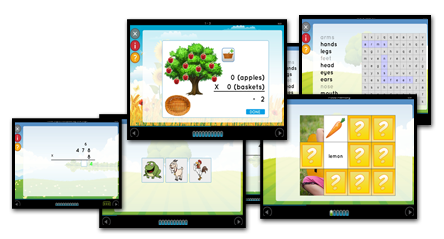
Lessons(there are over 14,000 of them!) are self paced, colorful and engaging. For younger children, parents will appreciate that they are shorter and many are dictated or have an audio feature if your student isn't yet reading on his own. Overall the program is very user friendly and easy to navigate. 
Essential Skills Advantage Review
How we used it:
I found the program to be most useful as a tool to practice those early math and reading skills. The interactive online platform makes refreshing those addition and subtraction facts fun, almost like a new and improved flash card. Tried and true, it's six year old approved!
ESA is easily accessed on mobile devices, and has been a nice addition to our library of educational activities on the boys' kindle fires. Since everything is online it's completely portable and a great way to do school on the road or in the waiting room. I have really enjoyed incorporating online educational resources into our homeschool because they are easy to access from just about anywhere, and save space on the bookshelf and weight in the backpack. 
Another nice feature of The Complete Learning Suite is the  "marks manager" tool. It allows teachers and parents to be able to check detailed progress in each subject area and print out reports for record keeping or certificates just for fun.
My only complaint about the product would be that the scores given at the end of each lesson were inconsistent and did not always accurately reflect the students work. For example, Evan could miss 7 out of 10 questions in a math lesson and still receive 100%. Again, this did not happen every time but was noticeable on more than one occasion. 
Product Details:
This is a digital product that you can purchase as low as $7.99 per month, or buy as a package deal for 6 or 12 months with the option of adding more students. Here's a more detailed snapshot of the variety of subjects covered in The Complete Learning Suite.
Click on the banner below to see what the fellow crew thought of learning with ESA!

http://schoolhousereviewcrew.com/complete-home-learning-suite-essential-skills-advantage-review/
And, be sure to check out ESA on social media at the following links:
Facebookhttps://www.facebook.com/skillsadvantage/
Twitterhttps://twitter.com/SkillsAdvantage @SkillsAdvantage
Pinteresthttps://www.pinterest.com/SkillsAdvantage
Google +https://plus.google.com/u/0/
LinkedInhttps://www.linkedin.com/company/skillsadvantage
Bloghttp://buyesa.com/blog/